
Resque Admin
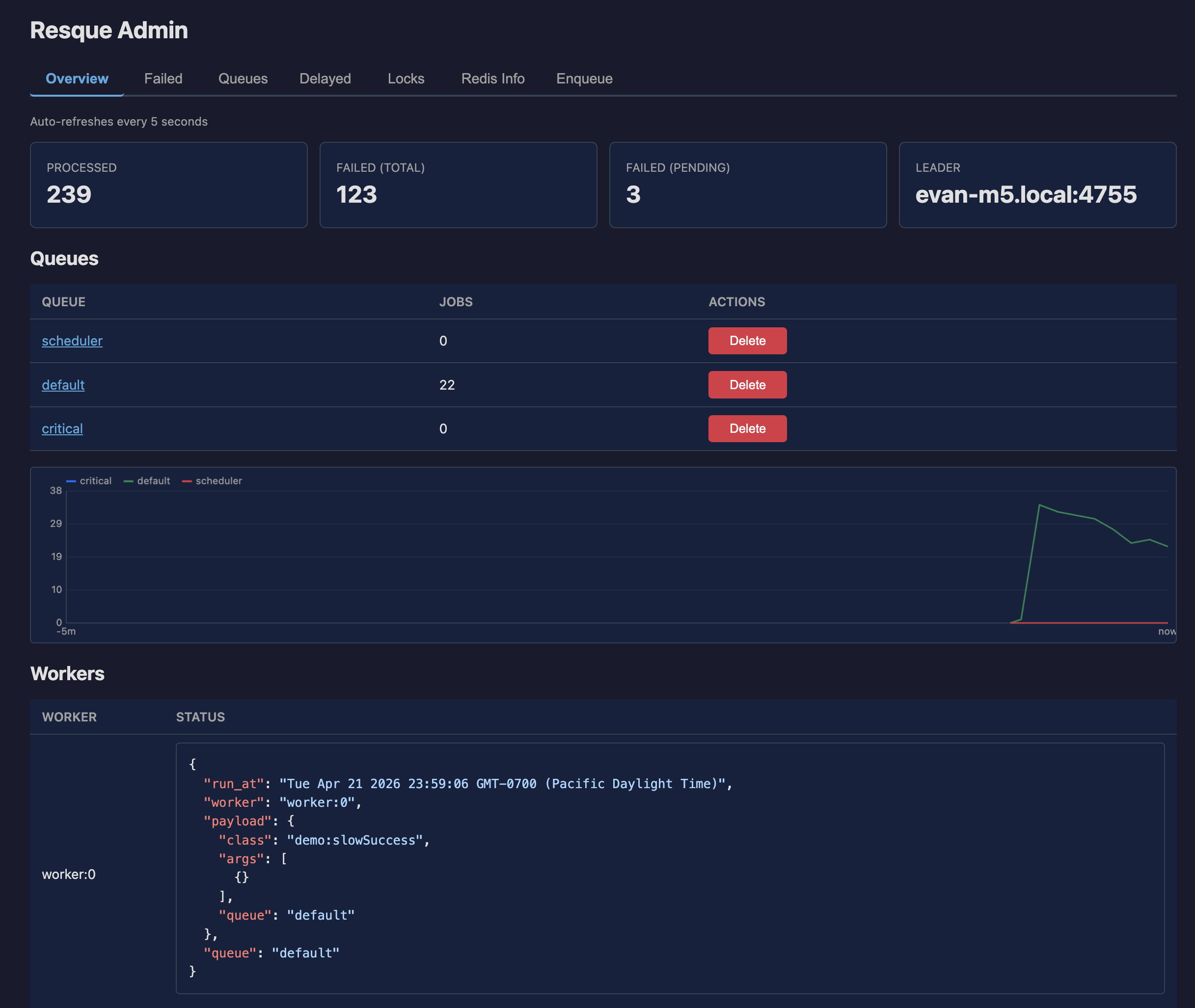
@keryxjs/resque-admin provides a password-protected web dashboard and a set of API endpoints for monitoring your Keryx application's background task system. Think of it as a modern resque-web for Keryx.
Installation
bun add @keryxjs/resque-adminConfiguration
Register the plugin and set a password:
// config/plugins.ts
import { resqueAdminPlugin } from "@keryxjs/resque-admin";

export default {
  plugins: [resqueAdminPlugin],
};// config/resqueAdmin.ts
export default {
resqueAdmin: {
password: process.env.RESQUE_ADMIN_PASSWORD || "",
},
};The password is required. If no password is set, all admin endpoints return a 500 error until one is configured.
| Config | Env | Default | Purpose |
|---|---|---|---|
resqueAdmin.password | "" | Shared password for every JSON endpoint | |
resqueAdmin.serveUi | RESQUE_ADMIN_SERVE_UI | true | When false, the built-in HTML dashboard is not served. JSON endpoints stay available |
Web Dashboard
Visit /api/resque-admin in your browser to access the dashboard. You'll be prompted for the admin password, which is stored in sessionStorage for the duration of your browser session.
The dashboard includes:
- Overview — queue lengths, worker status, processed/failed stats, leader info (auto-refreshes every 5 seconds)
- Failed — browse failed jobs with retry and remove actions
- Queues — inspect jobs in any queue, delete queues
- Delayed — view all scheduled future jobs by timestamp
- Locks — list and delete resque locks
- Redis Info — parsed output of the Redis
INFOcommand organized by section - Enqueue — manually enqueue any action as a background task
Bring your own UI
The JSON endpoints are usable on their own. If you want to build the dashboard yourself, skip the built-in HTML so GET /resque-admin stays free:
import { createResqueAdminPlugin } from "@keryxjs/resque-admin";

export default {
  plugins: [createResqueAdminPlugin({ serveUi: false })],
};
RESQUE_ADMIN_SERVE_UI=false does the same for the default resqueAdminPlugin export. Setting config.resqueAdmin.serveUi = false after boot 404s the shell if it was already registered, but doesn't unbind the route — use the factory when you want to occupy it yourself.
API Endpoints
All endpoints except the UI require the password parameter. For GET requests, pass it as a query parameter. For POST requests, include it in the JSON body.
| Endpoint | Method | Description |
|---|---|---|
/resque-admin | GET | Web dashboard UI (no password required) |
/resque-admin/overview | GET | Queue lengths, workers, stats, leader, failed count |
/resque-admin/failed | GET | Failed jobs with pagination (start, stop) |
/resque-admin/retry-failed | POST | Retry a failed job (failedJob as JSON string) |
/resque-admin/remove-failed | POST | Remove a failed job (failedJob as JSON string) |
/resque-admin/queue/:queue | GET | Jobs in a specific queue with pagination |
/resque-admin/del-queue | POST | Delete a queue and all its jobs (queue) |
/resque-admin/locks | GET | All resque locks |
/resque-admin/del-lock | POST | Delete a lock (lock) |
/resque-admin/delayed | GET | All delayed jobs by timestamp |
/resque-admin/redis-info | GET | Parsed Redis INFO output |
/resque-admin/enqueue | POST | Enqueue an action (actionName, inputs, queue) |
Security
- The password is sent as a query parameter (GET) or in the request body (POST). Use HTTPS in production.
- All admin actions are excluded from MCP tool exposure (
mcp: { tool: false }). - The password field is marked with
secret()so it won't appear in logs or Swagger documentation. - Consider placing these endpoints behind a VPN or reverse proxy with additional authentication in production environments.
The password check is exported as ResqueAdminPasswordMiddleware, so you can reuse it on your own actions:
import { ResqueAdminPasswordMiddleware } from "@keryxjs/resque-admin";

export class QueueDrain implements Action {
  name = "queue:drain";
  middleware = [ResqueAdminPasswordMiddleware];
  // ...
}
It compares against config.resqueAdmin.password in constant time, rejecting with a 401 on mismatch and a 500 when no password is configured.